Get Started#
Install#
pyEMAPS runs on 64-bit Windows with Python 3.12, 3.13, 3.14 or 3.15. 8 GB of RAM or more is recommended. Install it in its own environment, so its dependencies don’t clash with your other packages:
python -m venv .venv
.venv\Scripts\activate
pip install pyemaps
conda create -n pyemaps python=3.12
conda activate pyemaps
pip install pyemaps
pip also installs NumPy (2.0 or later), matplotlib (3.8.4 or later) and emaps, the compiled simulation backend built for your Python version. On Python 3.7, pip installs pyEMAPS 1.1.x. If the installation fails, see Frequently Asked Questions.
To read EMD files (.emd) from Thermo Fisher Velox or in the Berkeley EMD format, install the
emd extra too, which adds the h5py package (Python 3.12 to 3.14 for now):
pip install "pyemaps[emd]"
Check the installation#
pyemaps --version
pyemaps --sample
--version prints the pyEMAPS version, and --sample runs short kinematic and dynamic
simulations of Silicon and shows the results. Its plot windows close by themselves.
Your first diffraction pattern#
Every simulation starts from a Crystal. Load Silicon from the
built-in library, generate its kinematic diffraction pattern with the default settings, and
show it:
from pyemaps import Crystal, DPList, showDif

if __name__ == '__main__':
    silicon = Crystal.from_builtin('Silicon')
    emc, pattern = silicon.generateDP()

    patterns = DPList('Silicon')
    patterns.add(emc, pattern)
    showDif(patterns)
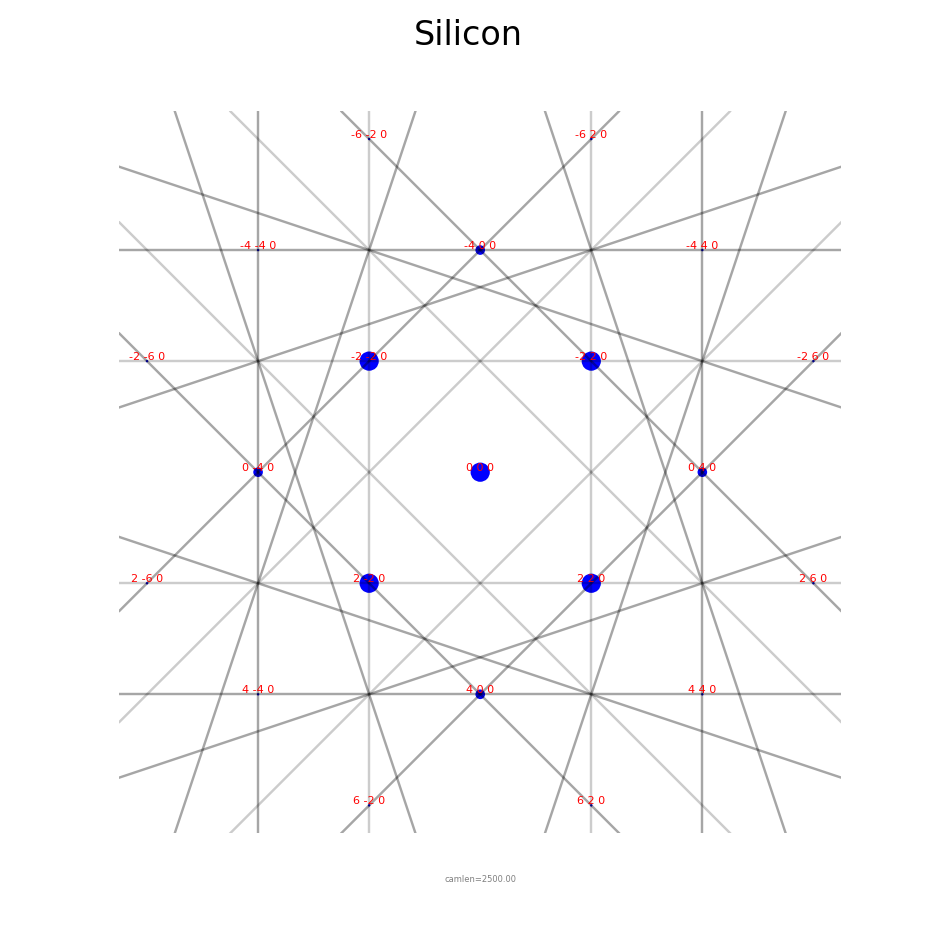
emc holds the microscope and simulation controls that were used, and pattern is the diffraction pattern: its Kikuchi lines, HOLZ lines and diffracted beams.
Note
Keep the if __name__ == '__main__': line in scripts. The show functions draw in a
separate process, and on Windows that process re-runs your script. Without the line,
Python stops with a RuntimeError about the bootstrapping phase. Jupyter notebooks
don’t need it.
Next steps#
Kinematic and dynamic diffraction, stereodiagrams, crystals, and 4D-STEM indexing.
pyemaps -cp samples copies them into a pyemaps_samples folder.
Where pyEMAPS reads crystals and saves results.
For 4D-STEM indexing, database generation and other extended features.